

🪲 Report Issues or Bugs to Support
If you encounter issues while using Tatum, follow this guide to ensure faster resolution. Providing the right details upfront helps our support team diagnose and resolve problems efficiently.
Pre-Check: Quick Troubleshooting
Before opening a ticket, please verify the following:
- Isolate the Request: Test the failing API endpoint in a standalone tool like Postman or cURL.
- If it works in Postman but fails in your code: The issue is likely in your local environment or logic.
- If it fails in Postman: Please provide the full request and response logs.
- Verify Network Status: Ensure the blockchain network you are targeting (Mainnet/Testnet) is currently operational.
Steps to Report
Step 1: Fetch Your Account Information
Find your Account_ID in the Tatum Dashboard (bottom left corner).
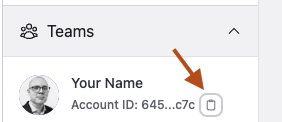
Tatum Dashboard Left Corner
Step 2: Provide a Clear Issue Description
When contacting support, include a concise issue description.
- Problem Statement: Clearly describe what went wrong.
- ✅ Example: "The
/v4/data/wallet/portfolioendpoint returns a400 Bad Requestspecifically on the ethereum-mainnet network."
- ✅ Example: "The
- Expected Outcome: Explain what you expected to happen.
- ✅ Example: "I expected a response with the balance."
- Steps to Reproduce: List the exact actions taken. Include the API Endpoint, the Payload Sent (remove private keys if involved), and the Response Received.
Step 3: Check Specific Troubleshooting Resources
If your issue relates to a specific feature, check these docs first:
Security & Scope
❗️ Discharge of Responsibility
Your privateKey(s) and mnemonics/seed phrases must remain confidential and secure at all times.
Warning
- Never share your private keys or mnemonics with anyone.
- Tatum staff will NEVER request your private keys. If someone asks for them, assume it is a scam and report it immediately.
Third-Party Code
Tatum support is strictly limited to Tatum REST API calls. We do not review, debug, or evaluate third-party code or custom application logic.
Legacy Tools (JS SDK & KMS)
If you are using our older integrations, please ensure:
- Tatum JS SDK: You are on the latest version available on GitHub.
- Tatum KMS: You have verified your KMS configuration.
Bug Bounty Program
Currently, Tatum does not have an active bug bounty program. However, we prioritize reports of potential vulnerabilities. While we do not offer formal rewards, we are committed to addressing security issues promptly.
Final Checklist Before Contacting Support:
- Reviewed documentation related to your issue.
- Verified your API requests in an isolated environment like Postman.
- Included your Account_ID and scrubbed Private Keys from your logs.
Updated 6 months ago